> ## Documentation Index
> Fetch the complete documentation index at: https://docs.oculusproxies.com/llms.txt
> Use this file to discover all available pages before exploring further.
# How to Integrate Oculus Proxies With Diffbot
> Diffbot is an AI-powered web extraction platform that automatically turns any webpage into clean, structured JSON. Articles, products, people, organizations, and more, without writing custom scrapers.
 ## What is Diffbot?
**Diffbot** uses computer vision and machine learning to analyze and extract data from web pages at scale. With APIs like Article, Product, Organization, and Knowledge Graph, it delivers ready-to-use structured data in seconds. When paired with **Oculus Proxies**, you can rotate IPs, bypass geo-blocks, avoid rate limits, and ensure high success rates—even on protected or region-locked sites.
If you're using **Oculus** to access search engines like **Google, Bing, or Yandex** and facing connection issues, your proxy type may need adjustment. **ISP Premium Proxies** provide stable and unrestricted access, preventing blocks that standard proxies might encounter. Switching to **ISP Premium Proxies** can improve performance.
## How to Integrate Oculus Proxies With Diffbot
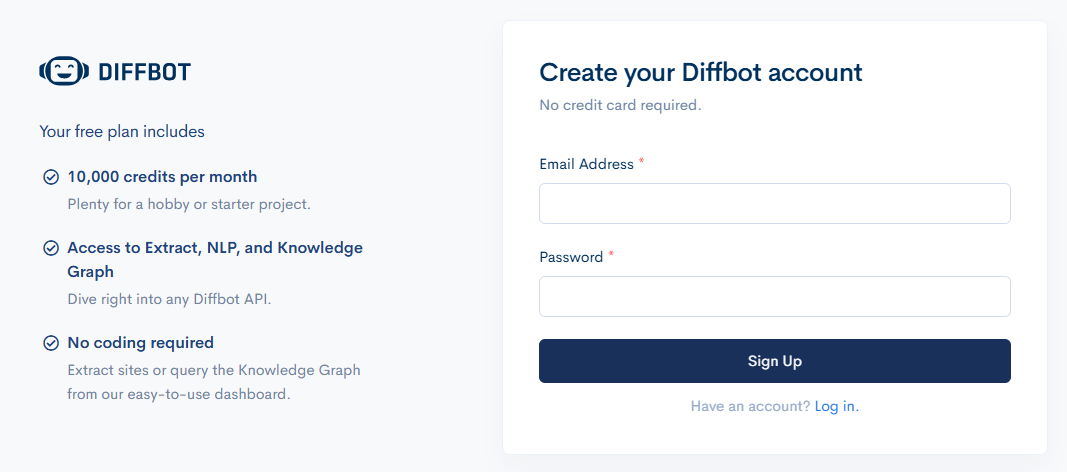
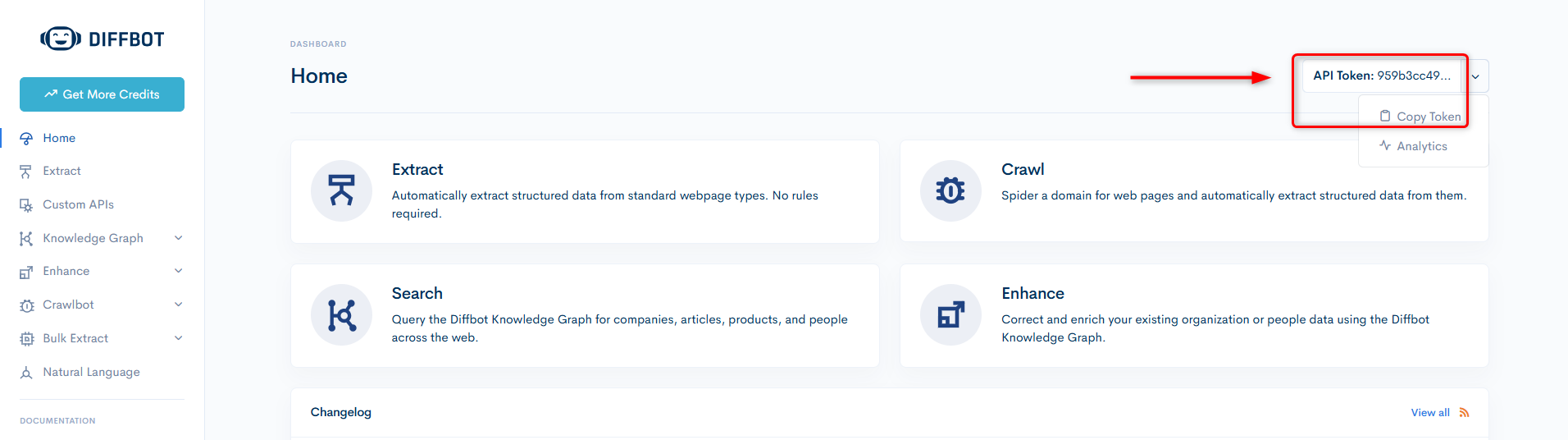
Visit [Diffbot](https://diffbot.com/) and register for a free account. Then, retrieve your **API key** from the top-right corner of the dashboard.
## What is Diffbot?
**Diffbot** uses computer vision and machine learning to analyze and extract data from web pages at scale. With APIs like Article, Product, Organization, and Knowledge Graph, it delivers ready-to-use structured data in seconds. When paired with **Oculus Proxies**, you can rotate IPs, bypass geo-blocks, avoid rate limits, and ensure high success rates—even on protected or region-locked sites.
If you're using **Oculus** to access search engines like **Google, Bing, or Yandex** and facing connection issues, your proxy type may need adjustment. **ISP Premium Proxies** provide stable and unrestricted access, preventing blocks that standard proxies might encounter. Switching to **ISP Premium Proxies** can improve performance.
## How to Integrate Oculus Proxies With Diffbot
Visit [Diffbot](https://diffbot.com/) and register for a free account. Then, retrieve your **API key** from the top-right corner of the dashboard.
 Use any HTTP/SOCKS5 proxy, residential, ISP or datacenter in the following format: `http://username:password@host:port`.
Example cURL to make an API call via proxy (replace placeholders with your credentials):
* **Host:** `proxy.oculus-proxy.com`
* **Port:** Enter the port number from your [Oculus Dashboard](https://oculusproxies.com/dashboard).
* **Username:** Input your Oculus Proxy **username**.
* **Password:** Input your Oculus Proxy **password**.
* **Token:** Enter your Diffbot **API key**.
```bash theme={null}
curl "https://api.diffbot.com/v3/article?token=YOUR_TOKEN&url=https://example.com/article" --proxy http://[username]:[password]@[host]:[port]
```
Example using requests to query a target URL (replace proxy credentials as needed):
```javascript javascript theme={null}
const options = { method: 'GET', headers: { accept: 'application/json' } };
const apiUrl =
"https://api.diffbot.com/v3/article?" +
"url=https%3A%2F%2Fwww.amazon.com%2Fs%3Fk%3Dgaming%26_encoding%3DUTF8%26content-id%3Damzn1.sym.edf433e2-b6d4-408e-986d-75239a5ced10%26pd_rd_r%3Dd782a9fe-5930-442a-b9ff-b43594099714%26pd_rd_w%3DuZEDx%26pd_rd_wg%3DMzL55%26pf_rd_p%3Dedf433e2-b6d4-408e-986d-75239a5ced10%26pf_rd_r%3D0MCKXWVTYPQPSJS79SB7%26ref%3Dpd_hp_d_atf_unk" +
"&token=your_token" +
"&proxy=[host]:[port]" +
"&proxyAuth=[username]:[password]";
fetch(apiUrl, options)
.then(res => res.json())
.then(res => console.log(res))
.catch(err => console.error(err));
```
```python python theme={null}
import requests
url = (
"https://api.diffbot.com/v3/article?"
"url=https%3A%2F%2Fwww.amazon.com%2Fs%3Fk%3Dgaming%26_encoding%3DUTF8%26content-id%3Damzn1.sym.edf433e2-b6d4-408e-986d-75239a5ced10%26pd_rd_r%3Dd782a9fe-5930-442a-b9ff-b43594099714%26pd_rd_w%3DuZEDx%26pd_rd_wg%3DMzL55%26pf_rd_p%3Dedf433e2-b6d4-408e-986d-75239a5ced10%26pf_rd_r%3D0MCKXWVTYPQPSJS79SB7%26ref%3Dpd_hp_d_atf_unk"
"&token=your_token"
"&proxy=[host]:[port]"
"&proxyAuth=[username]:[password]"
)
headers = {"accept": "application/json"}
response = requests.get(url, headers=headers)
print(response.text)
```
That's it, your set! You can always learn more from the [official documentation](https://docs.diffbot.com/reference/introduction-to-diffbot-apis) of Diffbot.
Use any HTTP/SOCKS5 proxy, residential, ISP or datacenter in the following format: `http://username:password@host:port`.
Example cURL to make an API call via proxy (replace placeholders with your credentials):
* **Host:** `proxy.oculus-proxy.com`
* **Port:** Enter the port number from your [Oculus Dashboard](https://oculusproxies.com/dashboard).
* **Username:** Input your Oculus Proxy **username**.
* **Password:** Input your Oculus Proxy **password**.
* **Token:** Enter your Diffbot **API key**.
```bash theme={null}
curl "https://api.diffbot.com/v3/article?token=YOUR_TOKEN&url=https://example.com/article" --proxy http://[username]:[password]@[host]:[port]
```
Example using requests to query a target URL (replace proxy credentials as needed):
```javascript javascript theme={null}
const options = { method: 'GET', headers: { accept: 'application/json' } };
const apiUrl =
"https://api.diffbot.com/v3/article?" +
"url=https%3A%2F%2Fwww.amazon.com%2Fs%3Fk%3Dgaming%26_encoding%3DUTF8%26content-id%3Damzn1.sym.edf433e2-b6d4-408e-986d-75239a5ced10%26pd_rd_r%3Dd782a9fe-5930-442a-b9ff-b43594099714%26pd_rd_w%3DuZEDx%26pd_rd_wg%3DMzL55%26pf_rd_p%3Dedf433e2-b6d4-408e-986d-75239a5ced10%26pf_rd_r%3D0MCKXWVTYPQPSJS79SB7%26ref%3Dpd_hp_d_atf_unk" +
"&token=your_token" +
"&proxy=[host]:[port]" +
"&proxyAuth=[username]:[password]";
fetch(apiUrl, options)
.then(res => res.json())
.then(res => console.log(res))
.catch(err => console.error(err));
```
```python python theme={null}
import requests
url = (
"https://api.diffbot.com/v3/article?"
"url=https%3A%2F%2Fwww.amazon.com%2Fs%3Fk%3Dgaming%26_encoding%3DUTF8%26content-id%3Damzn1.sym.edf433e2-b6d4-408e-986d-75239a5ced10%26pd_rd_r%3Dd782a9fe-5930-442a-b9ff-b43594099714%26pd_rd_w%3DuZEDx%26pd_rd_wg%3DMzL55%26pf_rd_p%3Dedf433e2-b6d4-408e-986d-75239a5ced10%26pf_rd_r%3D0MCKXWVTYPQPSJS79SB7%26ref%3Dpd_hp_d_atf_unk"
"&token=your_token"
"&proxy=[host]:[port]"
"&proxyAuth=[username]:[password]"
)
headers = {"accept": "application/json"}
response = requests.get(url, headers=headers)
print(response.text)
```
That's it, your set! You can always learn more from the [official documentation](https://docs.diffbot.com/reference/introduction-to-diffbot-apis) of Diffbot.